
Online Digital Signature Certificate (DSC) Registration in India
Register a Pvt Ltd Company in India online with ease; Streamlined Process expert assistance, and digital documentation.
- No Hidden Charges
- Lowest Price Guarantee
No Hidden Charges
Lowest Price Guarantee
Posted onTrustindex verifies that the original source of the review is Google. Audit Tick streamlined our company registration seamlessly. Their team was efficient, knowledgeable, and extremely helpful throughout the process. Highly recommended for quick and reliable service!Posted onTrustindex verifies that the original source of the review is Google. Knowledgeable staff I never metPosted onTrustindex verifies that the original source of the review is Google. awesome audit work with audit tickPosted onTrustindex verifies that the original source of the review is Google. Good workPosted onTrustindex verifies that the original source of the review is Google. Working skills awesomePosted onTrustindex verifies that the original source of the review is Google. Work is goodPosted onTrustindex verifies that the original source of the review is Google. Nice experience with audit tick for It returns fillingPosted onTrustindex verifies that the original source of the review is Google. SuperrrrbPosted onTrustindex verifies that the original source of the review is Google. Excellent audit filling with audit tickPosted onTrustindex verifies that the original source of the review is Google. Iam fully satisfied with Audit tick, superrrrb
Procure your digital Signature Online in 3 Steps
Step 1
Click "Add to Cart" to Purchase Digital Signature Certificate (DSC)
Step 2
Verify identity through online paperless process
Step 3
Download your Digital Signature Certificate
Find the best plan for your needs
Digital signature certificate (DSC)
A Digital Signature Certificate (DSC) is a secure digital key that certifies the identity of its holder, issued by licensed certifying authorities. It functions as the digital equivalent of a physical certificate and includes critical user information such as name, pin code, country, email address, and the date of issuance, along with the name of the certifying authority. These certificates use public key encryptions to create signatures, ensuring that the signer’s identity is validated and the data within the document has not been altered. DSCs are essential for electronic documents and are legally admissible in court.
Digital Signature Certificates can be used for signing, encrypting documents, or both, and are typically issued for periods of 1 to 3 years. Their primary purpose is to allow documents to be digitally signed, providing a secure method to verify transactions and legal documents electronically. This capability makes DSCs critical in maintaining the integrity and security of digital communications and transactions.
Types Classes Uses of Digital Signature Certificates
Click Here to Explore Types, Classes & Uses of Digital Signature Certificates (DSC)
Documents Required for Individual DSC Application
To apply for a Digital Signature Certificate as an individual, the following documents are necessary
Applicant’s PAN Card
Applicant’s Address Proof
Digital Passport-Size Photo
Email ID and Mobile Number
Note: Please make sure that any uploaded/scanned document is fully readable and keep the ORIGINALS of the SAME DOCUMENT handy during video recording.
Digital Signature Certificate (DSC) Application Process
DSC Application Procedure-Individual
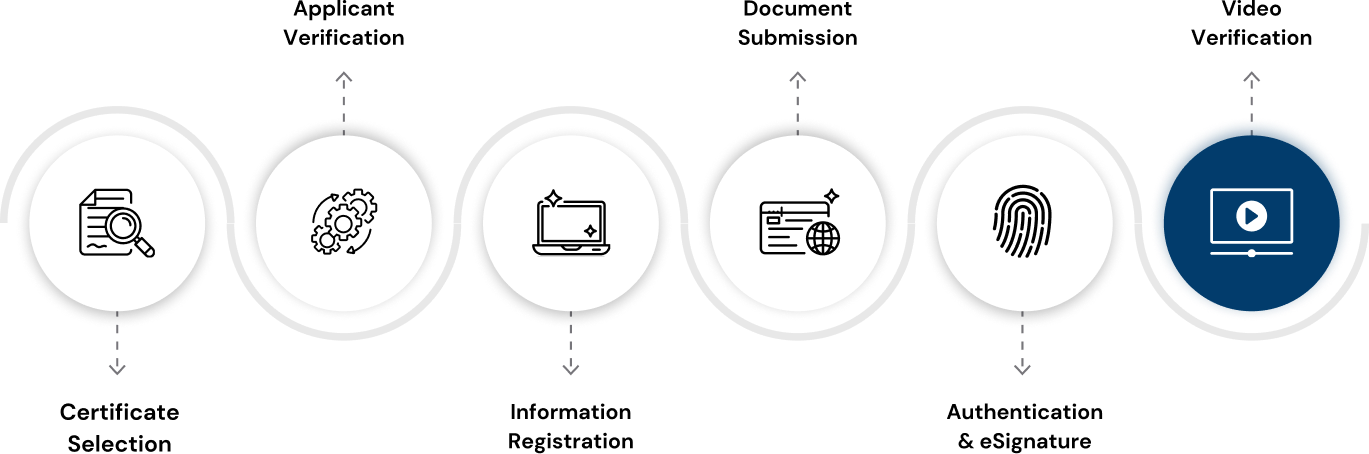
Enter PAN: Input the Permanent Account Number (PAN) to start the verification process.
System Verification: The system will verify if the PAN is already registered with eMudhra/Pantasign/
Registered: Proceed without requiring additional information.
Not Registered: Choose from the following verification methods:
- PAN (our chosen approach)
- Offline Aadhaar XML
- Online Aadhaar (OTP)
- Online Aadhaar (Biometric)
Using PAN:
- Fill in personal details including Name, Gender, Date of Birth, Complete Address, and Contact Information.
- Optional: Complete registration for Login Username, PIN, and OTP through a verification link sent via email.
Using Offline Aadhaar XML:
- Upload the Aadhaar XML file and enter the associated share code along with contact details.
- Optional: Set up Login Username and PIN via a link provided by email.
Using Online Aadhaar (OTP):
- Authenticate using a registered mobile OTP and provide contact details.
- Optional: Complete additional registration steps via email link.
Using Online Aadhaar (Biometric):
- Perform biometric authentication and provide necessary contact details.
- Optional: Further setup through email verification link.
PIN Entry: Input the pre-established PIN for identity confirmation.
Mobile OTP: Authenticate your mobile number using the OTP sent to your registered mobile.
For New Applicants:
- A video recording session will be initiated through a link sent to your registered email. Follow the instructions to complete this step.
For Existing Applicants:
- A link for a new video recording session will be sent if required.
- Note: Applicants verified through Online Aadhaar (Biometric) do not require a video recording.
DSC Validity:
The Certifying Authorities are authorized to issue a Digital Signature Certificate with a validity of one, two or three years.
Find the best plan for your needs
Digital signature certificate (DSC)
A Digital Signature Certificate (DSC) is a secure digital key that certifies the identity of its holder, issued by licensed certifying authorities. It functions as the digital equivalent of a physical certificate and includes critical user information such as name, pin code, country, email address, and the date of issuance, along with the name of the certifying authority. These certificates use public key encryptions to create signatures, ensuring that the signer’s identity is validated and the data within the document has not been altered. DSCs are essential for electronic documents and are legally admissible in court.
Digital Signature Certificates can be used for signing, encrypting documents, or both, and are typically issued for periods of 1 to 3 years. Their primary purpose is to allow documents to be digitally signed, providing a secure method to verify transactions and legal documents electronically. This capability makes DSCs critical in maintaining the integrity and security of digital communications and transactions.
Types Classes Uses of Digital Signature Certificates
Click Here to Explore Types, Classes & Uses of Digital Signature Certificates (DSC)
Documents Required for Organization DSC Application
DSC Applicant Information
Applicant’s PAN Card
Authorized Signatory Photo
Authorized Signatory Proof
ID Proof of the Authorized Signatory
Recent Bank statement/Bank Certificate
Organization Details
Organization PAN Card
Incorporation/Registration Certificate
GST Certificate (If applicable)
Email ID
Mobile Number
Note: Please make sure that any uploaded/scanned document is fully readable and keep the ORIGINALS of the SAME DOCUMENT handy during video recording.
Documents Required for Organization DSC Application
DSC Applicant Information
Organization Details
Applicant’s PAN Card
Organization PAN Card
Authorized Signatory Photo
Incorporation/Registration Certificate
Authorized Signatory Proof
GST Certificate (If applicable)
ID Proof of the Authorized Signatory
Email ID
Recent Bank statement/Bank Certificate
Mobile Number
Note: Please make sure that any uploaded/scanned document is fully readable and keep the ORIGINALS of the SAME DOCUMENT handy during video recording.
Organization Digital Signature Certificate (DSC) Application Process
DSC Application Procedure-organisation

Choose Certificate Type and Validity: Select the type and duration for which the certificate is required.
Set and Confirm Challenge Code: Enter a unique challenge code and retype it to confirm. This code will be needed when downloading your certificate.
Enter Organization PAN or Name: For private entities, provide the PAN; for government entities, provide the organization name.
System Validation:
- Already Registered: If already registered with eMudhra, you can proceed without additional details.
- Not Registered: Enter necessary organization details to register.
Identify the Applicant:
- If the applicant is the authorized signatory, select “I am also the authorized signatory” and proceed.
- If different, enter the DSC applicant’s PAN.
System Validation for DSC Applicant:
- Already Registered: If the applicant is already registered for this organization with eMudhra, no further information is required.
- Not Registered: Provide applicant details. Login username, PIN, and OTP can be set later through a verification link sent via email.
Enter Authorized Signatory’s PAN: Provide the PAN to continue.
System Validation for Signatory:
- Already Registered: No additional details are needed if the signatory is already registered.
- Not Registered: Enter signatory details. Credentials for login can be completed later through an email link.
New Applicants: A link for video recording will be sent along with instructions to set up the DSC applicant and authorized signatory credentials if these are not already created.
Existing Applicants: A link for new video recording will be sent.
DSC Validity:
The Certifying Authorities are authorized to issue a Digital Signature Certificate with a validity of one, two or three years.
Find the best plan for your needs
Digital signature certificate (DSC)
A Digital Signature Certificate (DSC) is a secure digital key that certifies the identity of its holder, issued by licensed certifying authorities. It functions as the digital equivalent of a physical certificate and includes critical user information such as name, pin code, country, email address, and the date of issuance, along with the name of the certifying authority. These certificates use public key encryptions to create signatures, ensuring that the signer’s identity is validated and the data within the document has not been altered. DSCs are essential for electronic documents and are legally admissible in court.
Digital Signature Certificates can be used for signing, encrypting documents, or both, and are typically issued for periods of 1 to 3 years. Their primary purpose is to allow documents to be digitally signed, providing a secure method to verify transactions and legal documents electronically. This capability makes DSCs critical in maintaining the integrity and security of digital communications and transactions.
Types Classes Uses of Digital Signature Certificates
Click Here to Explore Types, Classes & Uses of Digital Signature Certificates (DSC)
Documents Required for Foreign-Individual DSC Application
Address proof
Applicant’s Digital Passport-Size Photo
ID Proof
Email ID and Mobile Number
Note: Please make sure that any uploaded/scanned document is fully readable and keep the ORIGINALS of the SAME DOCUMENT handy during video recording.
Digital Signature Certificate (DSC) Application Process for Foreign Individuals
DSC Application Procedure-foreign individual
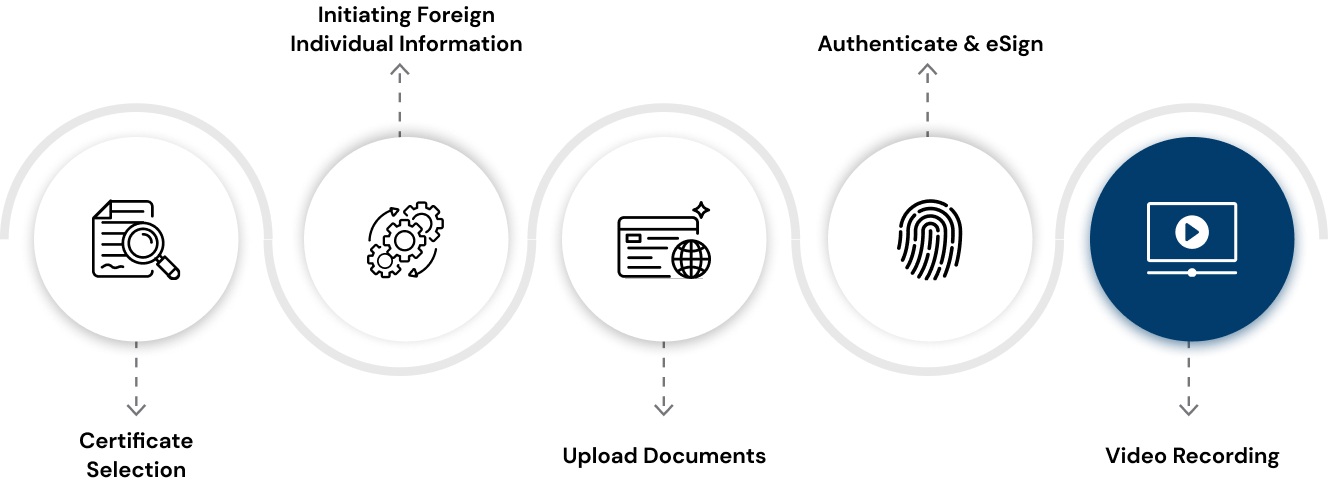
Select Certificate Type and Validity: Choose the type of certificate you require and the duration for which it will be valid.
Set Up and Confirm Challenge Code: Input a challenge code and re-enter it for confirmation. Keep this code safe as it will be needed for downloading the certificate.
Provide Mobile Number with ISD Code: Enter the mobile number along with the International Subscriber Dialing (ISD) code.
System Validation:
- Already Registered: If the mobile number is already registered with eMudhra, proceed without further information.
- Not Registered: Input additional details including Name, optional PAN, Date of Birth, Gender, complete Address (including PIN Code, State, City, Country), Mobile Number with ISD, and Email ID.
- Optional: Set up login credentials later via a link sent to the provided email
Enter Created PIN: Input the previously established PIN.
Email OTP Verification: Confirm your email address by entering the OTP sent to your email.
New Applicants:
- Receive a track and expedite link for video recording.
- Set up user credentials (Username, PIN, and OTP) if not previously created.
Existing Applicants:
- A link for a fresh video recording will be sent.
DSC Validity:
The Certifying Authorities are authorized to issue a Digital Signature Certificate with a validity of one, two or three years.
Find the best plan for your needs
Digital signature certificate (DSC)
A Digital Signature Certificate (DSC) is a secure digital key that certifies the identity of its holder, issued by licensed certifying authorities. It functions as the digital equivalent of a physical certificate and includes critical user information such as name, pin code, country, email address, and the date of issuance, along with the name of the certifying authority. These certificates use public key encryptions to create signatures, ensuring that the signer’s identity is validated and the data within the document has not been altered. DSCs are essential for electronic documents and are legally admissible in court.
Digital Signature Certificates can be used for signing, encrypting documents, or both, and are typically issued for periods of 1 to 3 years. Their primary purpose is to allow documents to be digitally signed, providing a secure method to verify transactions and legal documents electronically. This capability makes DSCs critical in maintaining the integrity and security of digital communications and transactions.
Types Classes Uses of Digital Signature Certificates
Click Here to Explore Types, Classes & Uses of Digital Signature Certificates (DSC)
Documents Required for Foreign-Organization DSC Application
DSC Applicant Information
Applicant’s PAN Card (optional)
Applicant’s photo
Individual ID Proofs
Applicant’s Email and Phone Number
Organization Details
Incorporation/Registration Document
Organization ID Proof
Authorization Letter
Organization Address Proof
Note: Please make sure that any uploaded/scanned document is fully readable and keep the ORIGINALS of the SAME DOCUMENT handy during video recording.
Documents Required for Foreign-Organization DSC Application
DSC Applicant Information
Organization Details
Applicant’s PAN Card (optional)
Incorporation/Registration Document
Applicant’s photo
Organization ID Proof
Individual ID Proofs
Authorization Letter
Applicant’s Email and Phone Number
Organization Address Proof
Note: Please make sure that any uploaded/scanned document is fully readable and keep the ORIGINALS of the SAME DOCUMENT handy during video recording.
Digital Signature Certificate (DSC) Application Process for Foreign Organisation
DSC Application Procedure-foreign organisation
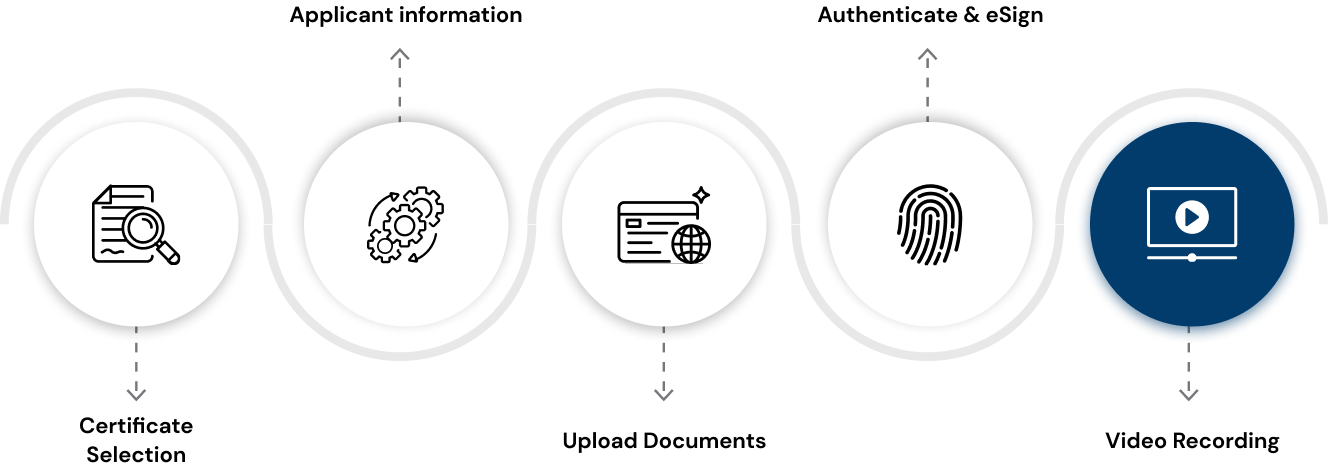
Select Certificate Type and Validity: Choose the appropriate certificate type and specify the duration for which the certificate will be valid.
Set and Confirm Challenge Code: Enter a challenge code and then re-enter it to confirm. Remember this code, as it will be required when downloading your certificate.
Enter Mobile Number and Organization Name: Provide the mobile number with the ISD code along with the organization name.
System Validation:
- Already Registered: If the mobile number is already registered with eMudhra, no further information is needed.
- Not Registered: Provide additional details including Name, optional PAN, Organization Unit, Date of Birth, Gender, full Address (including PIN Code, State, City, Country), and Email ID. Optional credentials (Login Username, PIN, and OTP) can be created later through a link sent via email.
Enter PIN: Provide the PIN that you have already created.
Verify Email via OTP: Confirm your email address by entering the OTP sent to your email.
New Applicants:
- A track and expedite link will be provided for video recording, along with setup instructions for Username, PIN, and OTP if these credentials have not been created.
Existing Applicants:
- A link for a new video recording session will be sent.
DSC Validity:
The Certifying Authorities are authorized to issue a Digital Signature Certificate with a validity of one, two or three years.
Class 3 DSC Renewal
Renewing your Class 3 DSC requires a new identity verification as per the guidelines established by the Controller of Certification Agencies (CCA). To renew your DSC, you must complete the same steps as you would when purchasing a new certificate. You can initiate the renewal process either before or after your current DSC expires, directly through the V Smart website.
The cost of renewing your DSC is equivalent to the price of obtaining a new one through our website. For a streamlined and efficient renewal, please visit our website and follow the outlined procedures.
Trust the Process & Grow Your Business
What is a Digital signature?
A digital signature is an electronic form of a signature that can be used to authenticate the identity of the sender of a message or the signer of a document and also ensure that the original content of the message or document that has been sent is unchanged. Digital signatures are easily transportable and cannot be imitated by someone else. The ability to ensure that the original signed message arrived means that the sender cannot easily disclaim it later.
Should an individual's signature and encryption certificate be different?
Yes, the signature and encryption certificate should be separate for an individual. The encryption keys are to be generated at the subscriber's system and should be archived before transfer into crypto-medium. The signature keys should be generated in the crypto-medium and not copied.
Does one require multiple certificates for different applications?
No, Ideally, there should not be any requirement for different certificates. However, the person holding a lower assurance Class 2 certificate may require higher assurance Class 3 certificates for application which demand the same. The higher assurance Class 3 certificates can be used wherever application requires a lower assurance certificate. Apart from assurance, additional certification may be required depending on the information included in the DSC (For example, PAN Number may be needed for the application).
Where can I use Digital Signature Certificate?
You can use Digital Signature Certificates for the following:
⦁ For sending and receiving digitally signed and encrypted emails.
⦁ For carrying out secure web-based transactions or identifying other participants of web-based transactions.
⦁ In e-Tendering, eProcurement, MCA [For Registrar of Companies efiling], Income Tax [For efiling income tax returns] Applications, and many other applications.
⦁ For signing documents like MSWord, MS Excel, and PDFs.
⦁ It plays a pivotal role in creating a paperless office.
⦁ All subscribers who use Digital Certificates for Income Tax, MCA (ROC), Tenders, Foreign Trade, Banking, Railways, and many other needs.
Whether Documents Signer Certificate can be treated as Organisational Certificate
The document signer certificate is issued for use with an organization's software for an automated authenticated response. A document signer certificate is not a replacement for the signature of the authorized signatory of the organization.
What is PKI?d as Organisational Certificate
A public key infrastructure (PKI) supports the distribution, verification, and revocation of public keys used for public-key encryption and enables linking identities with public-key certificates.
A PKI enables users and systems to securely exchange data over the Internet and verify the legitimacy of certificate-holding entities, such as webservers, other authenticated servers, and individuals. The PKI enables users to authenticate digital certificate holders and mediate the process of certificate revocation using cryptographic algorithms to secure the process.
What is the difference between a Digital Signature and a Digital Signature Certificate?
A digital signature is an electronic method of signing an electronic document, whereas a Digital Signature Certificate is a computer-based record that
⦁ Identifies the Certifying Authority issuing it.
⦁ Has the name and other details that can identify the subscriber.
⦁ Contains the subscriber's public key.
⦁ It is digitally signed by the Certifying Authority issuing it.
⦁ It is valid for either one year or two years.